<html> <head><title>401 Authorization Required</title></head> <body> <center><h1>401 Authorization Required</h1></center> <hr><center>nginx</center> </body> </html> <!-- a padding to disable MSIE and Chrome friendly error page --> <!-- a padding to disable MSIE and Chrome friendly error page --> <!-- a padding to disable MSIE and Chrome friendly error page --> <!-- a padding to disable MSIE and Chrome friendly error page --> <!-- a padding to disable MSIE and Chrome friendly error page --> <!-- a padding to disable MSIE and Chrome friendly error page -->
# Return the error from auth service if any if($my_auth_error_decoded!=""){ add_headerContent-Type$my_auth_error_content_typealways; return401$my_auth_error_decoded; }
# Fall back to default nginx response return401; } # 此处省略N个字
tar -zxf grpc-1.17.0.tgz cd grpc-1.17.0 phpize ./configure --with-php-config=/usr/local/php/bin/php-config make make install # 在php.ini中增加 extension = grpc.so
执行php -m | grep grpc 应该会输出”grpc”,就代表成功了。
创建客户端文件,这里需要用到composer获取两个包,其中composer.json内容为:
1 2 3 4 5 6 7 8
{ "name":"grpc/grpc-demo", "description":"gRPC example for PHP", "require":{ "grpc/grpc":"^v1.3.0", "google/protobuf":"^v3.3.0" } }
// pattern: // { term } // term: // '*' matches any sequence of non-/ characters // '?' matches any single non-/ character // '[' [ '^' ] { character-range } ']' // character class (must be non-empty) // c matches character c (c != '*', '?', '\\', '[') // '\\' c matches character c
// character-range: // c matches character c (c != '\\', '-', ']') // '\\' c matches character c // lo '-' hi matches character c for lo <= c <= hi
func FieldsFunc(s []byte, f func(rune) bool) [][]byte // 以符合f方法的字符为分隔符切割s成多个子串(不含分隔符)
1 2 3
f := func(r rune)bool { return r == '#'} a := []byte("This is # and @") fmt.Printf("%s, %q\n", a, bytes.FieldsFunc(a, f)) // This is # and @, ["This is " " and @"]
func Index(s, sep []byte) int // 返回sep在s中的起始位置,如果sep不在s中则返回-1
1 2 3 4 5 6 7 8 9
s := []byte("Hello World!") sep := []byte("Hello") fmt.Printf("'%s' of '%s' is %d\n", sep, s, bytes.Index(s, sep)) // 'Hello' of 'Hello World!' is 0 sep = []byte("World") fmt.Printf("'%s' of '%s' is %d\n", sep, s, bytes.Index(s, sep)) // 'World' of 'Hello World!' is 6 sep = []byte("Bob") fmt.Printf("'%s' of '%s' is %d\n", sep, s, bytes.Index(s, sep)) // 'Bob' of 'Hello World!' is -1 sep = []byte("") fmt.Printf("'%s' of '%s' is %d\n", sep, s, bytes.Index(s, sep)) // '' of 'Hello World!' is 0
func IndexAny(s []byte, chars string) int // 返回chars中任意字符在s中出现的第一个位置,chars为空或找不到则返回-1.
func LastIndexAny(s []byte, chars string) int // 查找s中最后一次出现chars中任意字符的位置,找不到返回-1
func LastIndexByte(s []byte, c byte) int // 查找s中最后一次出现c字节的位置,找不到返回-1
func LastIndexFunc(s []byte, f func(r rune) bool) int // 查找s中符合f方法的字符位置,找不到返回-1
func Map(mapping func(r rune) rune, s []byte) []byte // 将s中的r替换成mapping(r)返回的字符,如果mapping返回负值,则丢弃
1 2 3 4 5 6 7 8 9 10 11
rot13 := func(r rune)rune { switch { case r >= 'A' && r <= 'Z': return'A' + (r-'A'+13)%26 case r >= 'a' && r <= 'z': return'a' + (r-'a'+13)%26 } return r } fmt.Printf("%s\n", bytes.Map(rot13, []byte("'Twas brillig and the slithy gopher..."))) // 'Gjnf oevyyvt naq gur fyvgul tbcure...
func Replace(s, old, new []byte, n int) []byte // 将s中的前n个old替换成new,如果n<0则替换全部
1 2 3 4
s := []byte("Bob takes you to Bob's house.") fmt.Printf("%s\n", bytes.Replace(s, []byte("Bob"), []byte("Lily"), 0)) // Bob takes you to Bob's house. fmt.Printf("%s\n", bytes.Replace(s, []byte("Bob"), []byte("Lily"), 1)) // Lily takes you to Bob's house. fmt.Printf("%s\n", bytes.Replace(s, []byte("Bob"), []byte("Lily"), -1)) // Lily takes you to Lily's house.
// A Buffer is a variable-sized buffer of bytes with Read and Write methods. // The zero value for Buffer is an empty buffer ready to use. type Buffer struct { buf []byte// contents are the bytes buf[off : len(buf)] off int// read at &buf[off], write at &buf[len(buf)] bootstrap [64]byte// memory to hold first slice; helps small buffers avoid allocation. lastRead readOp // last read operation, so that Unread* can work correctly.
// FIXME: it would be advisable to align Buffer to cachelines to avoid false // sharing. }
// bytes.Reader 实现了如下接口: // io.ReadSeeker // io.ReaderAt // io.WriterTo // io.ByteScanner // io.RuneScanner type Reader struct { s []byte i int64// current reading index prevRune int// index of previous rune; or < 0 }
// Reader 实现了对io.Reader对象的缓冲功能 type Reader struct { buf []byte rd io.Reader // reader provided by the client r, w int// buf read and write positions err error lastByte int lastRuneSize int }
Modified time.Time // Go 1.10 ModifiedTime uint16// Deprecated: Legacy MS-DOS date; use Modified instead. ModifiedDate uint16// Deprecated: Legacy MS-DOS time; use Modified instead.
CRC32 uint32 CompressedSize uint32// Deprecated: Use CompressedSize64 instead. UncompressedSize uint32// Deprecated: Use UncompressedSize64 instead. CompressedSize64 uint64// Go 1.1 UncompressedSize64 uint64// Go 1.1 Extra []byte ExternalAttrs uint32// Meaning depends on CreatorVersion }
const ( // Type '0' indicates a regular file.(普通文件) TypeReg = '0' TypeRegA = '\x00'// Deprecated: Use TypeReg instead.
// Type '1' to '6' are header-only flags and may not have a data body. TypeLink = '1'// Hard link(硬链接) TypeSymlink = '2'// Symbolic link(软链接/符号链接) TypeChar = '3'// Character device node(字符设备节点) TypeBlock = '4'// Block device node(块设备节点) TypeDir = '5'// Directory(目录) TypeFifo = '6'// FIFO node
// Type '7' is reserved.(保留项) TypeCont = '7'
// Type 'x' is used by the PAX format to store key-value records that // are only relevant to the next file. // This package transparently handles these types. TypeXHeader = 'x'// 可扩展头部
// Type 'g' is used by the PAX format to store key-value records that // are relevant to all subsequent files. // This package only supports parsing and composing such headers, // but does not currently support persisting the global state across files. TypeXGlobalHeader = 'g'// 全局扩展头部
// Type 'S' indicates a sparse file in the GNU format. TypeGNUSparse = 'S'// 稀疏文件
// Types 'L' and 'K' are used by the GNU format for a meta file // used to store the path or link name for the next file. // This package transparently handles these types. TypeGNULongName = 'L' TypeGNULongLink = 'K' )
变量(主要用于错误输出)
1 2 3 4 5 6
var ( ErrHeader = errors.New("archive/tar: invalid tar header") // 无效的tar头部 ErrWriteTooLong = errors.New("archive/tar: write too long") // 写入数据太长 ErrFieldTooLong = errors.New("archive/tar: header field too long") // 头部太长 ErrWriteAfterClose = errors.New("archive/tar: write after close") // 关闭后写入 )
Devmajor int64// Major device number (valid for TypeChar or TypeBlock)(字符设备或块设备的主设备号) Devminor int64// Minor device number (valid for TypeChar or TypeBlock)(字符设备或块设备的次设备号)
Xattrs map[string]string// Go 1.3 PAXRecords map[string]string// Go 1.10
Format Format // Go 1.10 }
Header的相关方法:
func FileInfoHeader(fi os.FileInfo, link string)(*Header, error) //该方法通过os.FileInfo来创建一个tar.Header,用在对已有文件打包十分方便
type Reader struct { r io.Reader pad int64// Amount of padding (ignored) after current file entry curr fileReader // Reader for current file entry blk block // Buffer to use as temporary local storage
// err is a persistent error. // It is only the responsibility of every exported method of Reader to // ensure that this error is sticky. err error }
type Writer struct { w io.Writer pad int64// Amount of padding to write after current file entry curr fileWriter // Writer for current file entry hdr Header // Shallow copy of Header that is safe for mutations blk block // Buffer to use as temporary local storage
// err is a persistent error. // It is only the responsibility of every exported method of Writer to // ensure that this error is sticky. err error }
grep: /usr/include/php/main/php.h: No such file or directory grep: /usr/include/php/Zend/zend_modules.h: No such file or directory grep: /usr/include/php/Zend/zend_extensions.h: No such file or directory Configuring for: PHP Api Version: Zend Module Api No: Zend Extension Api No:
这个我是直接去php官网下载系统当前版本的PHP源码(php-7.1.19.tar.gz),然后解压进入ext/mcrypt目录,如上所述的执行phpize和./configure以及make && sudo make install,修改php.ini增加extension=mcrypt.so。重启apache搞定。
Error: You are using macOS 10.14. We do not provide support for this pre-release version. You may encounter build failures or other breakages. Please create pull-requests instead of filing issues.
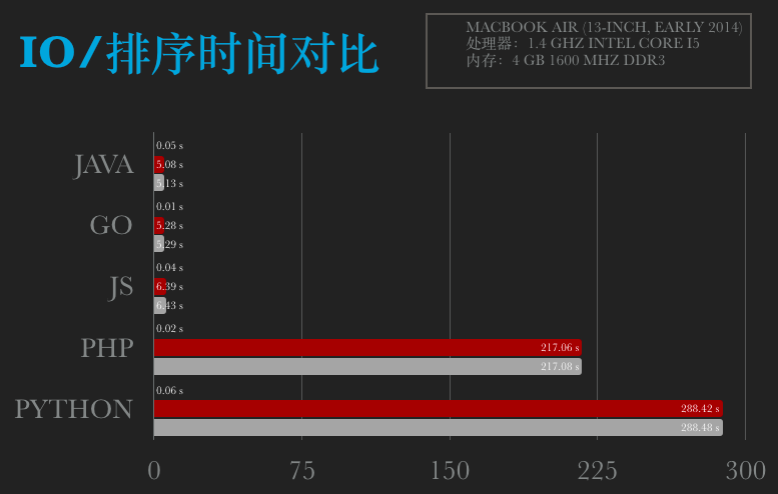
funcmain() { fileName := "Data.txt" data := make([]int, 0, 50000) start := time.Now() fi, err := os.Open(fileName) if err != nil { fmt.Printf("Error: %s\n", err) return } defer fi.Close() br := bufio.NewReader(fi) for { a, _, c := br.ReadLine() if c == io.EOF { break } num, _ := strconv.Atoi(string(a)) data = append(data, num) } endReadTime := time.Now() fmt.Printf("Read time: %fs\n", endReadTime.Sub(start).Seconds()) BubbleSort(data) endTime := time.Now() fmt.Printf("Sort time: %fs\n", endTime.Sub(endReadTime).Seconds()) fmt.Printf("finished time: %fs\n", endTime.Sub(start).Seconds()) }
funcBubbleSort(arr []int) { length := len(arr) var flag int var tmp int for i := 0; i < length; i++ { flag = 0 for j := 1; j < (length - i); j++ { if arr[j] < arr[j-1] { tmp = arr[j] arr[j] = arr[j-1] arr[j-1] = tmp flag = 1 } } if flag == 0 { return } } }
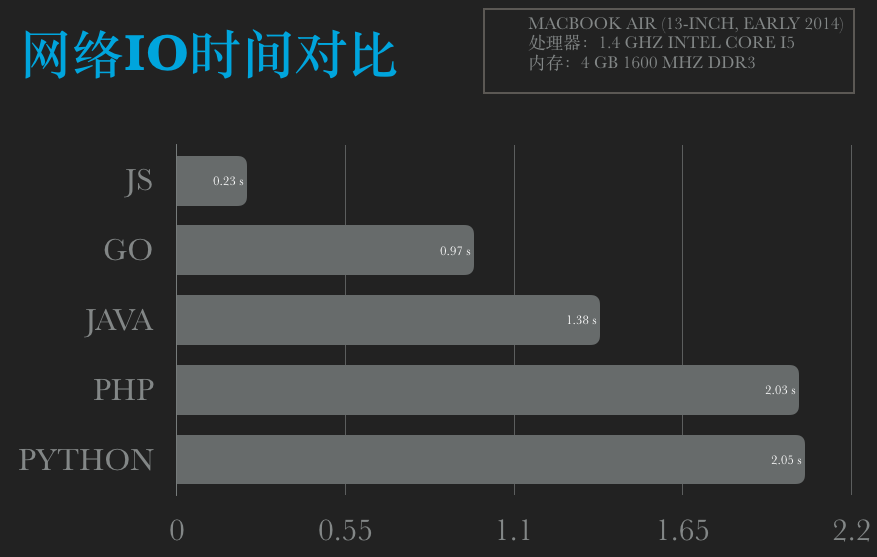
~/Workspaces/go » go run main.go cost time: 0.952737 ------------------------------------------------------- ~/Workspaces/go » go run main.go cost time: 0.983901 ------------------------------------------------------- ~/Workspaces/go » go run main.go cost time: 0.967799 ------------------------------------------------------- ~/Workspaces/go » go run main.go cost time: 0.972302 ------------------------------------------------------- ~/Workspaces/go » go run main.go cost time: 0.980509
res_data = urllib2.urlopen(req) res = res_data.read() return res t = time.time() for i in xrange(0, 20): # print "Get("+str(i)+"):" data = get("http://2018.ip138.com/ic.asp?count="+str(i)) # print data print'Python time: %.02fs' % (time.time() - t)
funcmain() { t1 := time.Now() for i := 0; i < 10000000; i++ { Aaa(float64(i)) } t2 := time.Now() fmt.Printf("Go time: %f s\n", t2.Sub(t1).Seconds()) }
funcAaa(i float64) { var a float64 = i + 1 var b float64 = 2.3 s := "abcdefkkbghisdfdfdsfds"
if a > b { a++ } else { b = b + 1 }
if a == b { b = b + 1 }
c := a*b + a/b - math.Pow(a, 2) d := s[0:strings.Index(s, "kkb")] + strconv.FormatFloat(c, 'E', -1, 64) _ = d }
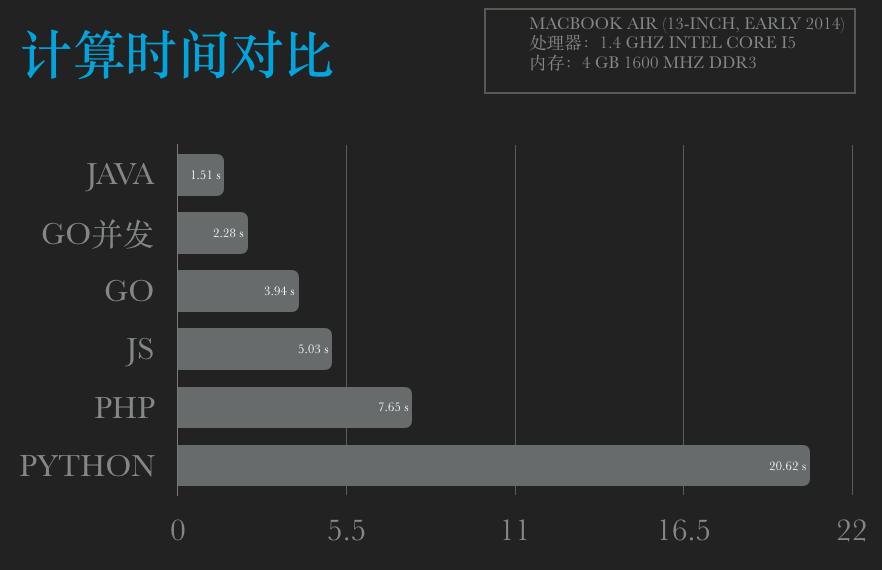
测试结果:
1 2 3 4 5 6 7 8 9 10 11 12 13 14 15 16
~/Workspaces/GoLand/src/Aaa » go build main.go ------------------------------------------------------- ~/Workspaces/GoLand/src/Aaa » ./main Go time: 4.083166 s ------------------------------------------------------- ~/Workspaces/GoLand/src/Aaa » ./main Go time: 4.095651 s ------------------------------------------------------- ~/Workspaces/GoLand/src/Aaa » ./main Go time: 4.154200 s ------------------------------------------------------- ~/Workspaces/GoLand/src/Aaa » ./main Go time: 4.175203 s ------------------------------------------------------- ~/Workspaces/GoLand/src/Aaa » ./main Go time: 4.111375 s
~/Workspaces/GoLand/src/Aaa » go build main.go ------------------------------------------------------- ~/Workspaces/GoLand/src/Aaa » ./main Go time: 2.326077 s ------------------------------------------------------- ~/Workspaces/GoLand/src/Aaa » ./main Go time: 2.270769 s ------------------------------------------------------- ~/Workspaces/GoLand/src/Aaa » ./main Go time: 2.277345 s ------------------------------------------------------- ~/Workspaces/GoLand/src/Aaa » ./main Go time: 2.252540 s ------------------------------------------------------- ~/Workspaces/GoLand/src/Aaa » ./main Go time: 2.255374 s
var t1 = (newDate()).getTime(); for(var i=0; i<10000000; i++){ aaa(i); } var t2 = (newDate()).getTime(); console.log("nodejs time:" + (t2 - t1) + "ms"); functionaaa(i){ var a = i + 1; var b = 2.3; var s = "abcdefkkbghisdfdfdsfds"; if(a > b){ ++a; }else{ b = b + 1; } if(a == b){ b = b + 1; } var c = a * b + a / b - Math.pow(a, 2); var d = s.substring(0, s.indexOf("kkb")) + c.toString(); }
import sys, time, math defaaa(i): a = i + 1 b = 2.3 s = "abcdefkkbghisdfdfdsfds" if a > b: a = a + 1 else: b = b + 1 if a == b: b = b + 1 c = a * b +a / b - math.pow(a, 2) d = s[0: s.find("kkb")] + str(c) t = time.time() for i in xrange(0, 10000000): aaa(i) print'Python time: %.02f s' % (time.time() - t)
[root@iZ28l1ca1vhZ ~]# service mysqld start
Starting MySQL.The server quit without updating PID file (/usr/local/mysql/data/iZ28l1ca1vhZ.pid). [FAILED]
[root@iZ28l1ca1vhZ ~]# service mysqld restart
Stopping MySQL: [ OK ] Starting MySQL: [ OK ] 4.登录并修改MySQL的root密码
/usr/bin/mysql
Welcome to the MySQL monitor. Commands end with ; or \g. Your MySQL connection id is 3 to server version: 3.23.56 Type ‘help;’ or ‘\h’ for help. Type ‘\c’ to clear the buffer. mysql> USE mysql ; Reading table information for completion of table and column names You can turn off this feature to get a quicker startup with -A Database changed mysql> UPDATE user SET Password = password ( ‘new-password’ ) WHERE User = ‘root’ ; Query OK, 0 rows affected (0.00 sec) Rows matched: 2 Changed: 0 Warnings: 0 mysql> flush privileges ; Query OK, 0 rows affected (0.01 sec) mysql> quit Bye 5.将MySQL的登录设置修改回来
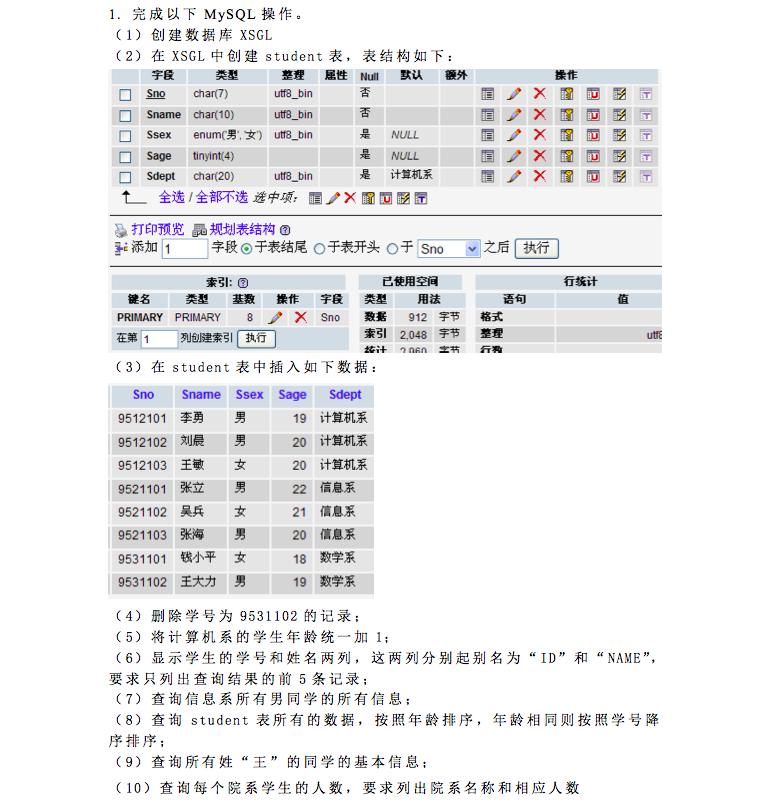
第三步,插入数据: insert into student(Sno,Sname,Ssex,Sage,Sdept) values ('9512101','李勇','男','19','计算机系'),('9512102','刘晨','男','20','计算机系'),('9512103','王敏','女','20','计算机系'),('9521101','张立','男','22','信息系'),('9521102','吴兵','女','21','信息系'),('9521103','张海','男','20','信息系'),('9531101','钱小平','女','18','数学系'),('9531102','王大力','男','19','数学系');
第四步,删除学号为'9531102'的记录: delete from student where Sno='9531102';
第五步,将计算机系的学生年龄统一加'1': update student set Sage=Sage+1 where Sdept='计算机系';
第六步,显示学生的学号和姓名两列,这两列分别起别名为“ID”和“NAME”, 要求只列出查询结果的前 5 条记录: select Sno as ID,Sname as NAME from student limit 5;
第七步,查询信息系所有男同学的所有信息: select * from student where Sdept='信息系' and Ssex='男';
第八步,查询 student 表所有的数据,按照年龄排序,年龄相同则按照学号降序排序: select * from student order by Sage ASC,Sno DESC;
第九步,查询所有姓“王”的同学的基本信息: select * from student where Sname LIKE '王%';
第十步,查询每个院系学生的人数,要求列出院系名称和相应人数: select COUNT(*) as '人数',Sdept from student GROUP BY Sdept; //如果一张表里面学号有重复的,必须去重!使用下面语句: select COUNT(DISTINCT Sno) as '人数',Sdept from student GROUP BY Sdept;
a //在当前光标位置的右边添加文本
i //在当前光标位置的左边添加文本
A //在当前行的末尾位置添加文本
I //在当前行的开始处添加文本(非空字符的行首)
O //在当前行的上面新建一行
o //在当前行的下面新建一行
R //替换(覆盖)当前光标位置及后面的若干文本
J //合并光标所在行及下一行为一行(依然在命令模式)
//登录MYSQL(有ROOT权限)。我里我以ROOT身份登录.
@>mysql -u root -p
@>密码
//首先为用户创建一个数据库(phplampDB)
mysql>create database phplampDB;
//授权phplamp用户拥有phplamp数据库的所有权限。
>grant all privileges on phplampDB.* to phplamp@localhost identified by '1234';
//刷新系统权限表
mysql>flush privileges;
mysql>其它操作
/*
如果想指定部分权限给一用户,可以这样来写:
mysql>grant select,update on phplampDB.* to phplamp@localhost identified by '1234';
//刷新系统权限表。
mysql>flush privileges;
*/
3.删除用户。
@>mysql -u root -p
@>密码
mysql>DELETE FROM user WHERE User="phplamp" and Host="localhost";
mysql>flush privileges;
//删除用户的数据库
mysql>drop database phplampDB;
4.修改指定用户密码。
@>mysql -u root -p
@>密码
mysql>update mysql.user set password=password('新密码') where User="phplamp" and Host="localhost";
mysql>flush privileges;
1、修改表,登录mysql数据库,切换到mysql数据库,使用sql语句查看
"select host,user from user ;"
\mysql -u root -p
\mysql>use mysql;
\mysql>update user set host = '%' where user ='root';
\mysql>select host, user from user;
\mysql>flush privileges; (使修改生效,必须执行)
2、授权用户,你想root使用密码从任何主机连接到mysql服务器
\mysql>GRANT ALL PRIVILEGES ON *.* TO 'root'@'%' IDENTIFIED BY 'admin1234' WITH GRANT OPTION;
\mysql>flush privileges; (使修改生效,必须执行)







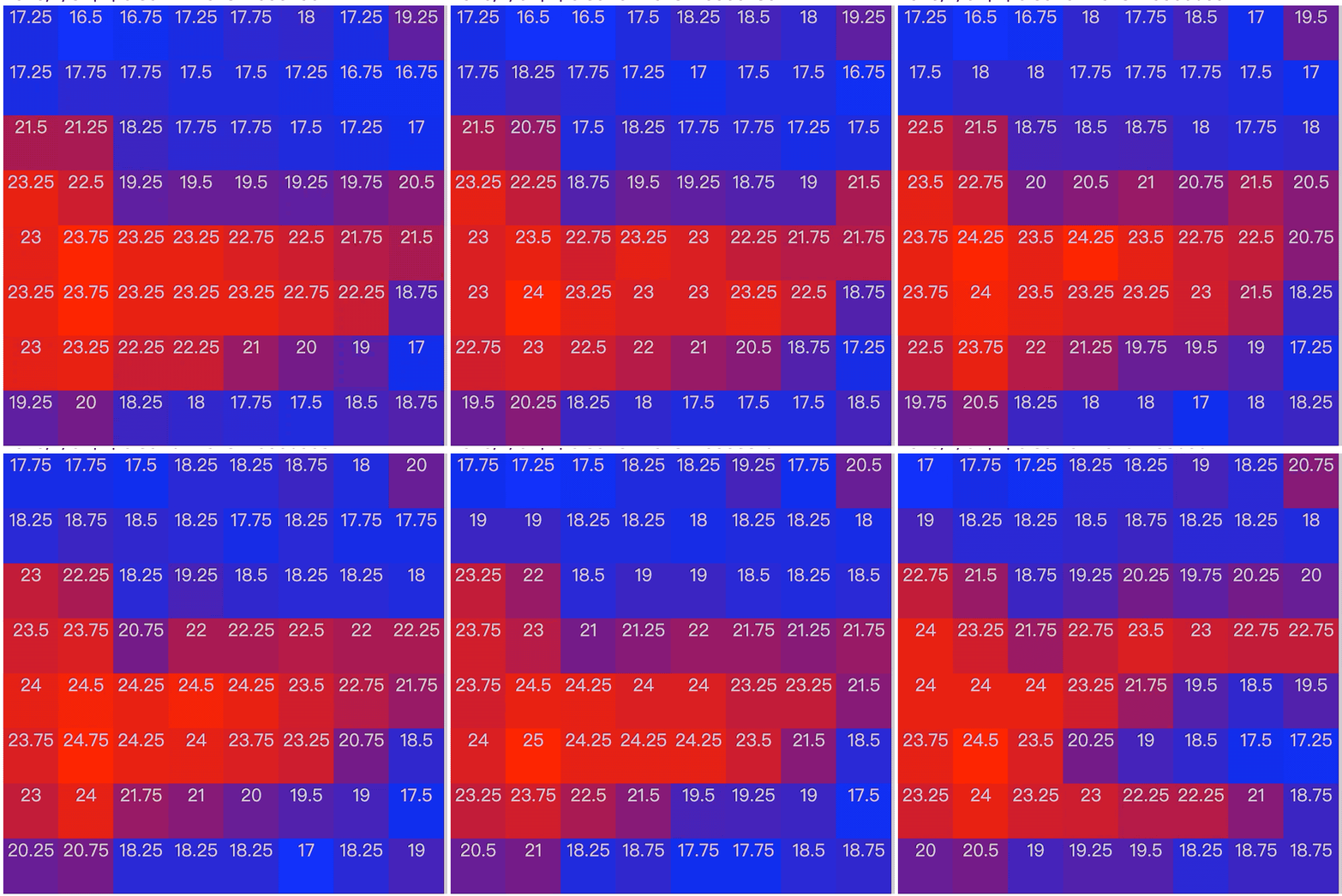 一次插值数据:
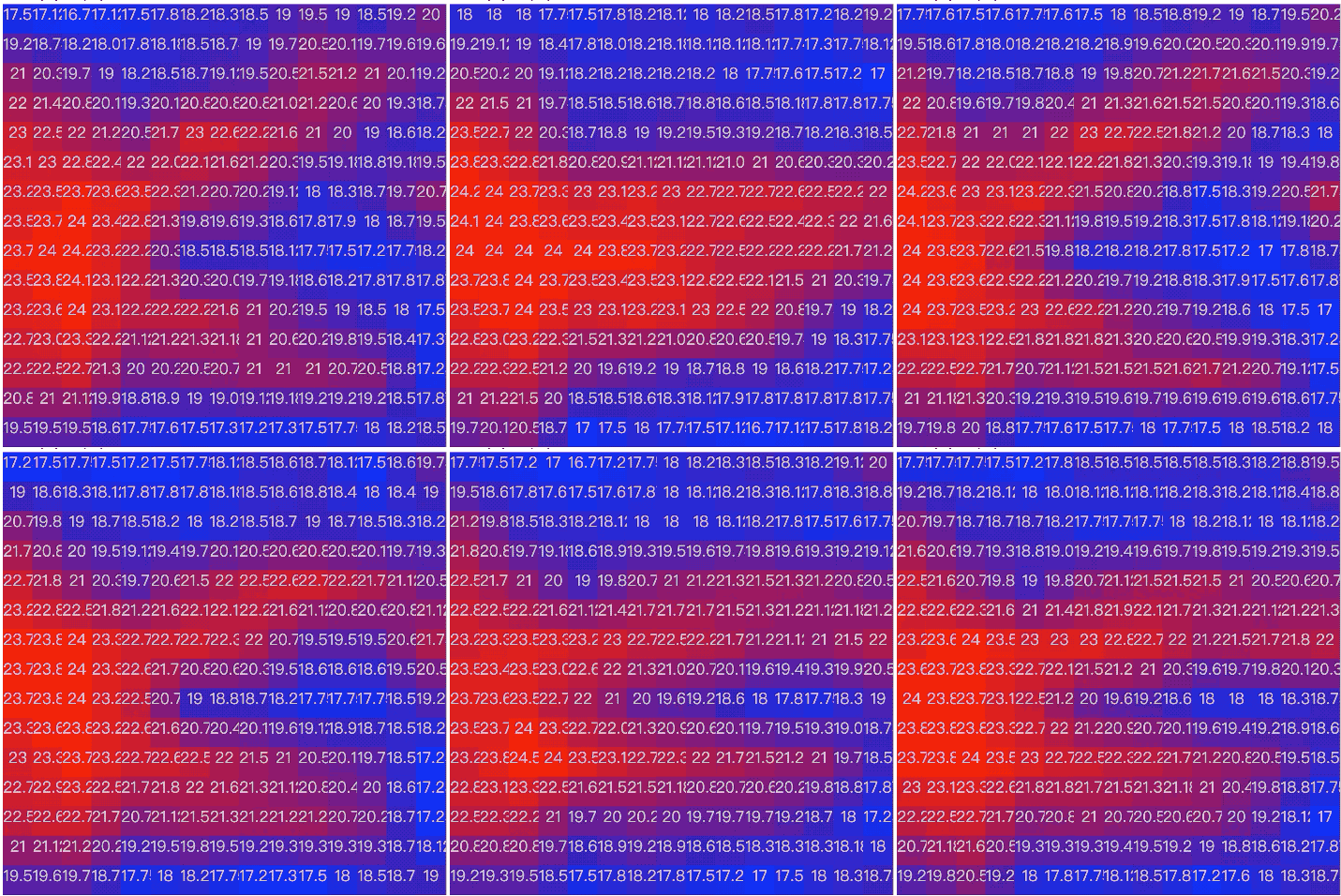 二次插值数据: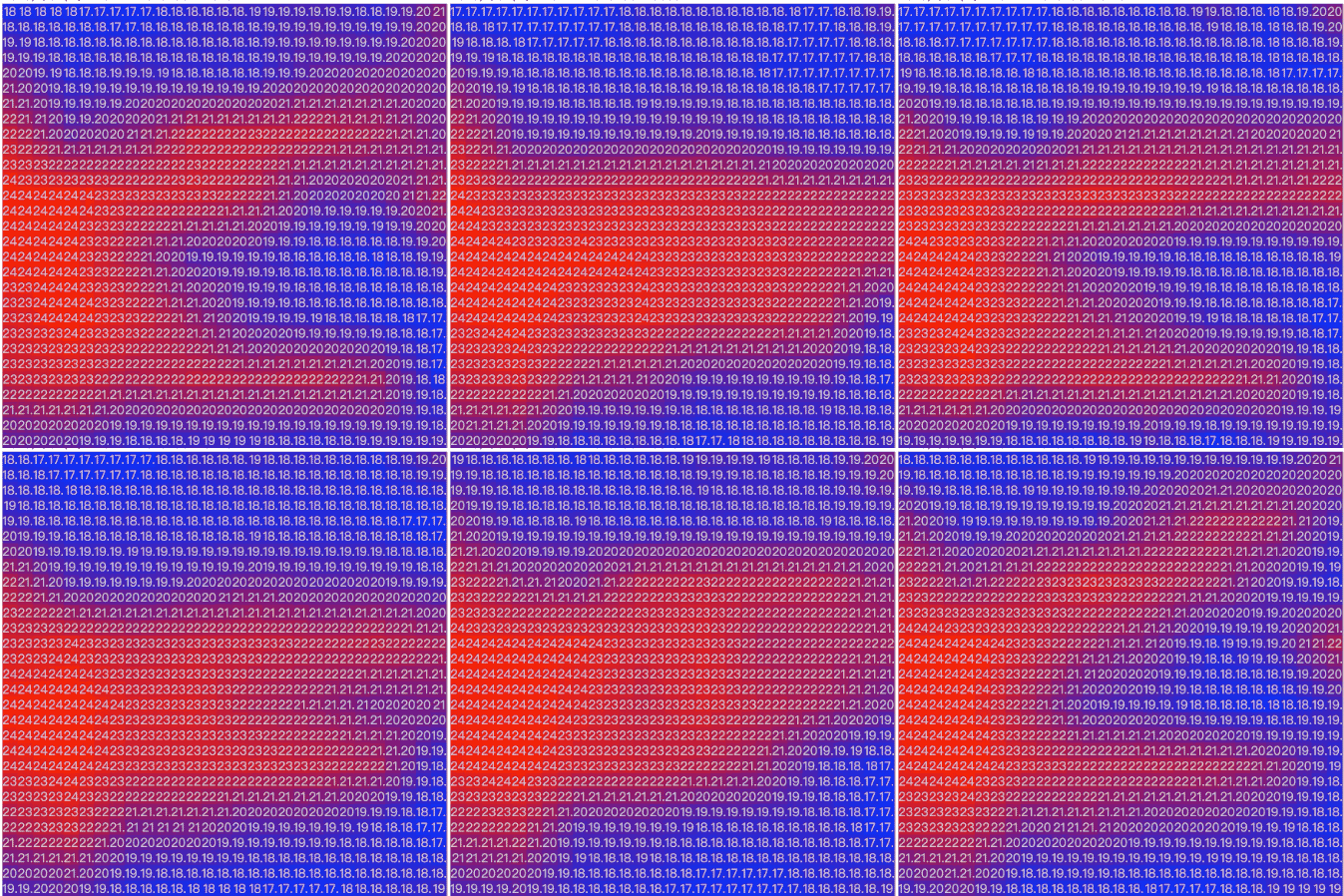


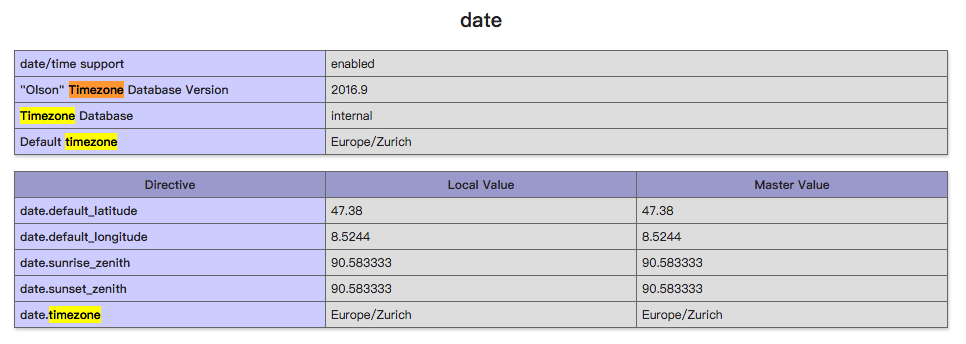

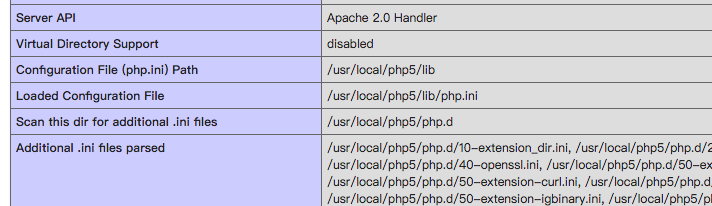
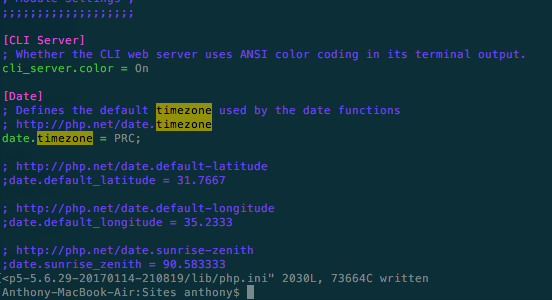
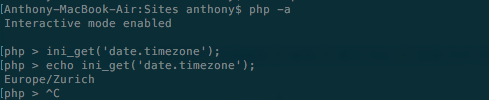









 Mac OS X系统下,几乎绝大部分文件夹中都包含 .DS_Store 隐藏文件,这里保存着针对这个目录的特殊信息和设置配置,例如查看方式,图标大小以及这个目录的一些附属元数据。